|
|
Scheduling
At this step you can schedule the synchronization operation so that Backup Platinum
would perform it automatically at a specified time.
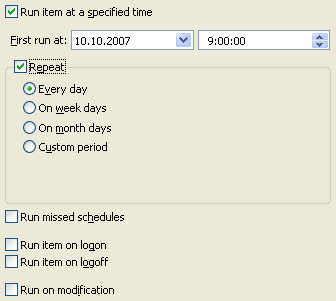
Run item at a specified time. Check this option to enable scheduling.
If an item is not scheduled, you can execute it manually at any convenient time.
To do this, select the item in the Items
View and click the "Synchronize" button
 on the toolbar.
| Note:
The program will perform scheduled operations only when Backup Platinum
agent is running. If you use Backup Platinum in service mode, the agent is running
all the time. If you use application mode, you need to be logged in to run the agent.
In this case, you might want to enable the "Run missed schedules" option.
|
First run at. Here you specify date and time when the synchronization should be
performed. If you want to repeat it regularly, here you specify date and time of the first run.
Repeat. Check this option if you want to repeat the synchronization regularly.
You will also need to specify how to repeat the operation. The following options are available.
 |
Every day.
The program will perform the synchronization every day at the time specified for the
first synchronization.
|
|
On week days.
The program will perform the synchronization on specified days of the week at
the time specified for the first synchronization. You can select as many days
of the week as you need.
|
|
On month days.
The program will perform the synchronization on specified days of the month
at the time specified for the first synchronization. You can select as many
days of the month as you need.
|
|
Custom period.
You can specify any time period between synchronization operations.
|
Run missed schedules. Use this option if you switch off your computer and can miss a
scheduled synchronization. If you enable this option, the program will detect if the item was
not processed on time and execute it as soon as possible.
Run item on logon. Select this option if you wish to run this item on logon.
Run item on logoff. Select this option if you wish to run this item on logoff.
Run on modification. If you check this option, the program will automatically
perform synchronization when any file/folder is changed in the source folder (from which
files are copied). In case you mirror 2 folders, synchronization will be made when any
file/folder is changed in any of these 2 folders.
"Next". |
|
|