Backup to CD, DVD, Blu Ray, FTP or LAN
Backup to DVD
 Home Download Order  Features Version History Help SoftLogica
 
Full CD-RW and DVD support with disk spanning
Full CD, DVD
and Blu Ray media support
Backup and synchronize with LAN and FTP
Backup and synchronize via LAN and FTP
Integrated ZIP compression
on the fly
128-bit compression with Blowfish
128-bit
Blowfish encryption
Full CD-RW and DVD support with disk spanning
Backup
of open
files
128-bit compression with Blowfish
Flexible and powerful scheduler
Integrated ZIP compression Can run in service mode on Windows 2000/
XP/2003/Vista
SoftLogica Newsletter
 
Subscribe to SoftLogica Newsletter to get 10% discount on newly released products!
 
Specify First Folder
Specify First Folder Back to Help IndexBack to index help

At this step you select the first folder for synchronization.
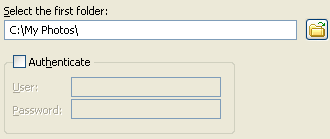


Click the "Browse for folder" button . In the "Browse For Folder" dialog, you can either select an existing folder or create a new one.

If the selected folder can be accessed only under some specific user account, you can check the "Authenticate" option and specify username and password.

"Next".
  Download

Order Now!


07.08.05
Backup Platinum successfully passed
the "Designed for Windows XP" certification
by Microsoft®


Produced by Softlogica


© 2003-2009 SoftLogica. +7-383-3356692, (toll-free for US): 888-364-6797.
Backup Platinum is a registered trademark. Registration #: 3272046.