Backup to CD, DVD, Blu Ray, FTP or LAN
Backup to DVD
 Home Download Order  Features Version History Help SoftLogica
 
Full CD-RW and DVD support with disk spanning
Full CD, DVD
and Blu Ray media support
Backup and synchronize with LAN and FTP
Backup and synchronize via LAN and FTP
Integrated ZIP compression
on the fly
128-bit compression with Blowfish
128-bit
Blowfish encryption
Full CD-RW and DVD support with disk spanning
Backup
of open
files
128-bit compression with Blowfish
Flexible and powerful scheduler
Integrated ZIP compression Can run in service mode on Windows 2000/
XP/2003/Vista
SoftLogica Newsletter
 
Subscribe to SoftLogica Newsletter to get 10% discount on newly released products!
 
FTP Settings
FTP Settings Back to Help IndexBack to index help

This tab enables you to customize the following FTP settings.
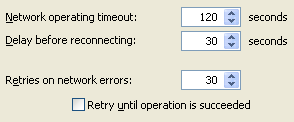


Network operating timeout: Time of waiting for response from a server. If this time is exceeded, Backup Platinum will try to reconnect.

Delay before reconnecting: Amount of time before the program reconnects.

Retries on network errors: Maximum number of transfer retries. If an error occurs during a transfer, Backup Platinum will try to transfer files again the number of times equal to this value.

Retry until operation is succeeded: If you check this option, then Backup Platinum will retry the transfer until your data is transferred successfully.

"Next".
  Download

Order Now!


07.08.05
Backup Platinum successfully passed
the "Designed for Windows XP" certification
by Microsoft®


Produced by Softlogica


© 2003-2009 SoftLogica. +7-383-3356692, (toll-free for US): 888-364-6797.
Backup Platinum is a registered trademark. Registration #: 3272046.