|
|
Advanced Synchronization Settings
At this step you specify various synchronization options.
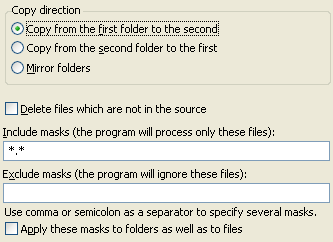
Copy direction. Here you can select the direction of copying.
 |
Copy from the first folder to the second.
Files will be copied only in one direction from the first folder to
the second. |
 |
|
Copy from the second folder to the first. Files
will be copied only in one direction from the second folder to the first. |
|
|
Mirror folders. Files will be copied in both directions
to make the contents of the folders identical.
|
Delete files which are not in the source.
This option is available if you select to
copy files only in one direction. If it is selected, all files that are present only in the
destination folder, but absent in the source folder will be deleted.
For files with the same names. This option is available if you select
to mirror folders. You should specify what to do with files with the same
names.
|
copy newer: the program will replace older file with the newer one; |
|
|
copy older: the program will replace newer file
with the older one; |
|
|
copy smaller: the program will replace larger file
with the smaller one; |
|
|
copy larger: the program will replace smaller file
with the larger one; |
|
|
skip: the program will not copy such files. |
Include masks (the program will process only these files). Here you can specify include masks.
Exclude masks (the program will ignore these files). Here you can specify exclude masks.
Backup Platinum will process only files that match at least one of include masks, but
do not match any of exclude masks. When you specify masks, you should separate them by
commas or semicolons. By default, "*.*" is used as include mask and no exclude
masks are specified. This means that all files selected for the item will be included.
Apply these masks to folders as well as to files. Use this option to apply specified
masks to folders as well as to files. If this option is not selected, masks are applied only to files.
Reflect file deletions. This option means that when you delete some file from one folder,
that file is deleted from another folder too. (This option is available if you select to mirror folders.)
"Next". |
|
|