|
|
Restoring Data from Backup Copy
To restore data, select the corresponding backup item
in the Items View and
click the "Restore" button
 on the toolbar. All files and folders included in the item will be restored
to their original locations.
on the toolbar. All files and folders included in the item will be restored
to their original locations.
If you don't need to restore all files, you can select only the required ones
in the Files View, right-click
on them and choose "Restore" from the menu.
If you want to restore one or several files/folders to a different from original location,
choose "Restore to..." command instead. The "Browse For Folder" dialog
will be displayed. Here you can select any existing folder or create a new one.
If you use backup with timestamps (if you turn on the "Store versions in subfolders using timestamps"
option on the Storage tab of item properties)
and have already made several backup copies of your files with different timestamps, then you can
choose what version of backup will be used for restoring.
Select the needed item with timestamps in
Items View, then select one or several files/folders in Files View and choose "Restore to..."
command on the right-click menu.
You will see the "Browse For Folder" dialog. Select any existing
folder or create a new one and click "OK". The "Timestamps" dialog will be displayed.
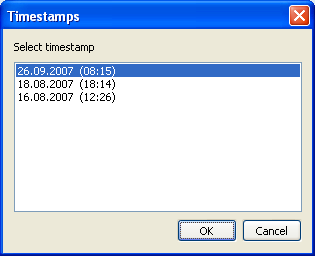
Here you can see the list of all timestamps when the backup of current item was made.
Choose desired timestamp and click "OK" to restore the files. Note that the upper timestamp
corresponding to the latest backup is chosen by default.
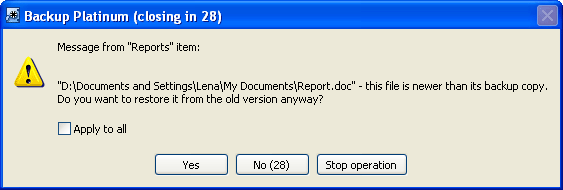
If you try to restore a file from a backup copy and it appears that backup copy is older than
the original file, you will receive the following warning message.
Click either "Yes" to restore the file from its old backup copy, or "No" to skip this file, or
"Stop operation" to stop the restoring operation. If you mark "Apply to all" checkbox, then selected
action will be applied to all files/folders in this item.
| Restoring from CD/DVD/Blu-Ray |
Insert the disc with the backup copy into your CD/DVD/BD device.
Now you can restore files as described above.
If your backup copy occupies several discs, and you do not know exactly which disc
contains files that you want to restore, you can insert any disc. If Backup Platinum
does not locate required files on that disc, it will prompt you to insert the next
span until files are found.
"Next". |
|
|