|
|
Advanced Settings
Here you can view and modify advanced program settings.
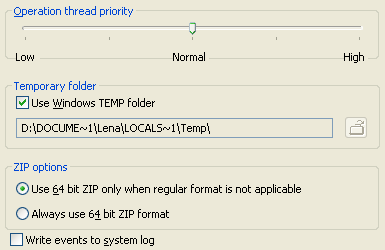
Operation thread priority: Enables to set the priority of operation thread,
which performs backup, restoration or synchronization. This parameter is used to
control consumption of resources: the lower is the priority, the less resources are
consumed, but the operation can take more time. You can change thread priority
dynamically. When you click the "Apply" button during operation execution, the
priority is immediately updated for all working threads that are performing the operation.
Temporary folder: Enables to specify on which drive the TEMP directory will
be located. Backup Platinum creates temporary files in case of compression, encryption
and backup onto CD/DVD/Blu-Ray discs. If there is not enough free space in TEMP folder
where such files are kept, Backup Platinum operations may fail. So in this case, you can
select another location for Backup Platinum TEMP files.
| |
Use Windows TEMP folder: If this option is checked, the program will place its
temporary files to the standard Windows TEMP folder (folder path will be displayed in
the box below). Otherwise, you can select another location for temporary files. Uncheck
the option, click the "Browse for temporary folder" button
 and select a new temporary folder.
|
 |
Use 64 bit ZIP only when regular format is not applicable:
If this option is selected, the program will start compressing data using regular
ZIP format, but, as soon as one of the limitations has been reached (more than 64535
files or folders in ZIP archive, archive size more than 4 GB, size of a file more
than 4 GB), the program will automatically start using 64 bit ZIP format.
|
|
Always use 64 bit ZIP format:
The program will always use 64 bit ZIP format.
|
Write events to system log: If you check this option, then all messages about
operation start and finish and messages about occurred errors will be written to
Windows event log (in addition to Backup Platinum log files).
"Next".
|
|
|