|
|
Program Menus
Program Menus allow managing your items, files
and log messages with a number of options.
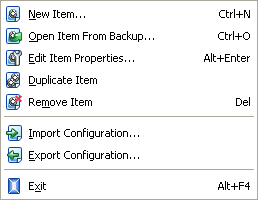
New Item..: Initiates the New Item Wizard for creation of a new
Backup or Synchronization item.
Open Item From Backup..: Initiates the Open Item Wizard for restoration of
backup item from its index file.
Edit Item Properties..: Opens the "Item Properties" dialog where you can
view and modify the properties of selected item.
Duplicate Item: Enables to make an identical copy or several copies of your
item. Such copies will appear in Items View.
Their names will look like "Copy #.. of..", for example, "Copy
#1 of My documents", "Copy #2 of My documents" etc.
Remove Item: Removes selected item (items).
Import Configuration..: Allows to import and restore Backup Platinum configuration
from a configuration file.
Export Configuration..: Allows to save Backup Platinum current configuration and
export it to a special file (with the extension ".bpc"). At this, the program allows
to select configuration elements for export and specify a location for exported configuration file.
Exit: Enables exiting the program. When you exit, the program will
still perform operations if your computer is on.
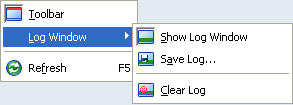
Toolbar:
Shows/hides program toolbar.
Log Window: Shows a number of options for log window and log entries.
-
Show Log Window: Shows/hides log window.
-
Save Log..:
Saves log entry to selected destination.
-
Clear Log:
Removes all log entries from the log window.
Refresh: Enables to refresh the current state of selected item
and its files/folders. Changes made to your items or files/folders will
be displayed in the corresponding program views.
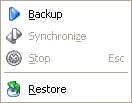
Backup:
Enables to backup selected Backup item.
Synchronize:
Enables to synchronize selected Synchronization item.
Stop: Stops specified operation
with selected item(s). The option is active only when the program is performing
some operation (backup, restoration or synchronization).
Restore: Enables to
restore selected Backup item.
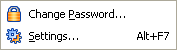
Change Password..:
Allows to set/change a password for Backup Platinum authorization on the agent.
Each user in application mode has his own password for Backup Platinum authorization.
For service mode there is a single password for Backup Platinum authorization.
Settings..: Allows viewing or modifying program
settings.
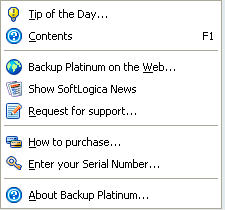
Tip of the Day..: Opens the "Tip of the Day" window.
Contents: Shows Backup Platinum Help topics.
Backup Platinum on the Web..: Takes you to Backup Platinum site on
the Web.
Show SoftLogica News: Takes you to SoftLogica News page on the Web.
Request for support..: You can send your comments and suggestions
or report your problems to Backup Platinum technical support team.
How to purchase..: Takes you to Backup Platinum page containing information
about purchasing and registration procedure.
Enter your Serial Number..: Use to register your copy of Backup Platinum
upon purchasing. For details, see Purchasing
and Registration section.
About Backup Platinum..: Provides information about the current version
of Backup Platinum.
"Next".
|
|
|