|
|
Self-extracting ZIP Archives
Backup Platinum can create self-extracting ZIP archives. This option is
available if you select a single ZIP archive or a single encrypted ZIP
archive as storage type.
Self-extracting ZIP archive is an executable file
that you can run on any computer, and it will automatically extract all files
and folders that it contains. Note that you don't have to use Backup Platinum
or any other program to extract files from such archive.
To create a self-extracting ZIP archive, you should enable the option
"Create self-extracting ZIP" in the
New Item Wizard
when you select storage options for your item. You can also enable it later
in the item properties ("Storage" tab). The name of
self-extracting ZIP archive will look like archive_name.zip.exe,
or archive_name.zip.ecd.exe, if you use the Blowfish encryption.
Run the archive to unpack it. You will see the following dialog.
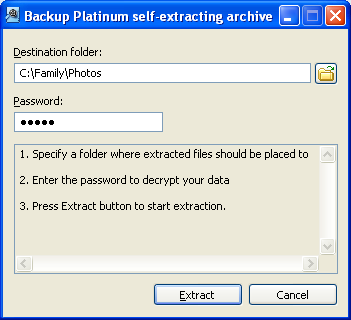
Follow these steps to extract files from the archive:
- Specify a folder where extracted files should be placed to ("Destination folder").
- Enter the password to decrypt your data. Password is required if you used data
encryption in your backup item (if you created a password-protected ZIP archive or
used the Blowfish encryption).
- Click the "Extract" button.
"Next".
|
|
|