|
|
General Settings
Here you can view and modify general program settings.
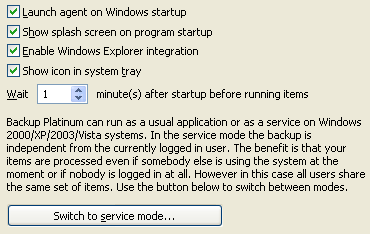
Launch agent on Windows startup: Launches Backup Platinum
agent
on Windows startup. This option is disabled in service mode.
Show splash screen on program startup:
Shows Backup Platinum splash screen on program startup.
Enable Windows Explorer integration: Enables
Windows
Shell Integration by adding Backup Platinum commands to the standard Windows
context menu.
Show icon in system tray: You can select to show or not to show Backup Platinum
tray icon in the system tray.
Wait N minute(s) after startup before running items:
Makes the program wait N minutes after Windows startup before it starts operations
with the items which are scheduled to be executed on logon (for such items the option
"Run item on logon" is enabled on the Scheduling
tab of item properties). The option to wait N minutes after startup is useful if you
have many other tasks performed on Windows startup and you don't want your system to
"freeze" because of too extensive CPU load.
Switch to service (application) mode..:
Initiates the Switch to Service Mode Wizard (Switch to Application Mode Wizard) for
switching Backup Platinum agent to the
service (application)
mode.
Service account..: When running Backup Platinum in the service mode, you can select
which system account to use. Click the "Service account..." button and specify an
account in the corresponding field. This button is visible only in service mode.
"Next".
|
|
|